


What signals lie behind fluctuating collections
Pages that were included yesterday have disappeared today, or only 3 of the 50 new articles added today have been included. You might think it's bad luck, or the algorithm is jerking around again. Let's stop this speculation for a moment - it's not metaphysics, it's search engines sending you clear, interpretable signals. Inclusion fluctuations are never random events, they are the most sensitive dashboard of your website's health.
It's important to first figure out: which fluctuations are normal and which are alarms that require you to act immediately. There are two kinds of normal fluctuations.
First, the new station at the beginning or after a large-scale revision, the search engine needs time to establish a “cognitive model”, included in the first month of fluctuations is a standard phenomenon.
The other is that during major updates to the search engine's core algorithms (e.g., a series of core updates between 2024-2025), indexing strategies across the web may be temporarily tightened or adjusted, and your site may be briefly “reevaluated”.
In addition to this, if you observe frequent fluctuations, a concentration on specific types of pages, or a site that is running steadily suddenly experiencesImportant pages continue to drop out of the indexsituation, then it is not a fluctuation, but a failure signal.
Just looking at the “total number of entries” figure can be misleading. It's too general. What will really help you pinpoint the problem is an often-overlooked report in the Google Search Console:“Crawled unindexed.”。
A lot of webmasters see the amount of inclusion fell immediately go to change the content, add chain, which is typical of tactical diligence to cover up strategic laziness. You have to first read the search engine in the end to tell you what.
When Google's crawler visits your page (crawled) but decides not to put it into the database for users to search (unindexed), it's like a censor picking up your document, flipping through a couple of pages, and then tossing it straight into the shredder. The reason for this is not in the delivery process, but in the content of the document itself.
Understanding this caliber is the basis for all your subsequent actions. It will tell you what the problem is:
Issue 1: The crawler came, but technical obstacles (such as a slow server response) prevented it from reading the content in its entirety. Rescue time is usually 3-7 days after the fix.
Issue 2: The crawler reads the content successfully, but deems it of insufficient value (e.g., thin content, high duplication) and decides to drop it for inclusion. This requires systematic cleaning and refactoring of the content, with a salvage cycle of about 15-30 days.
Issue 3: The site has triggered a site-level quality assessment downgrade due to a large number of low-quality pages or non-compliant operations, and important pages have been “implicated” in non-inclusion. This is the most serious case, and recovery may take 30-90 days.
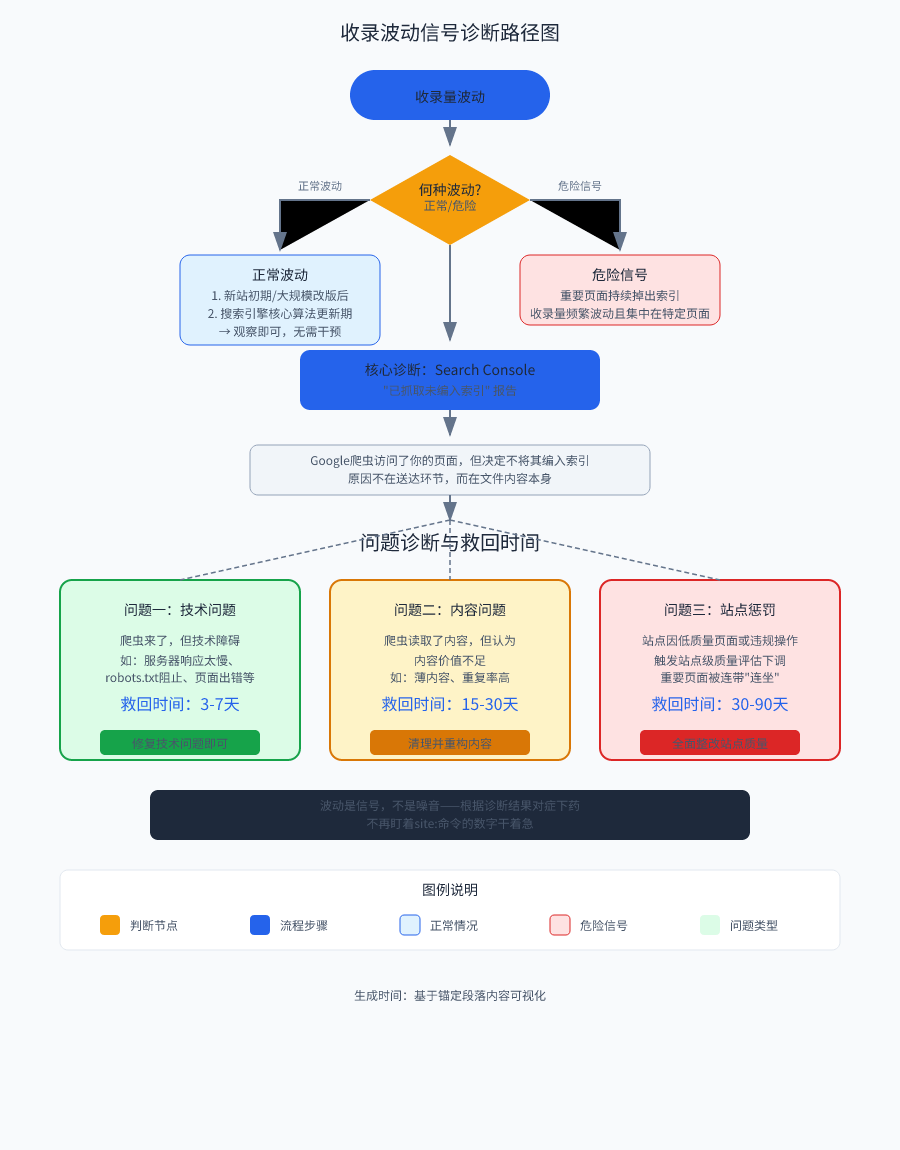
So stop staring at the site:command numbers and do nothing. Fluctuations are signals, not noise. Search engines have already given you a clear classification of faults by the action of whether or not the page can be “indexed”. Next, you need to learn to read the silent report in the Search Console, and start to treat the problem.
Reading Search Console's Silence
Open Search Console's “Indexing” report, and you'll see a data item that's easy to overlook -- theCrawled not indexed. Behind this number hides the real attitude of the search engine: you think it is working, in fact, it has been scoring you.
Crawled not indexedThe meaning is straightforward: Google's crawlers came by, read the page from start to finish, and decided - no inclusion. This decision is not random, it is based on the crawler's judgment of the value of the page. The technical aspects may not be a problem, the page can be opened, can be read, but the search engine that the pageNot worth being searched by users。
This is why it doesn't make sense to just focus on the total number of inclusions. When the total drops, you don't know if the crawlers aren't coming at all, or if they are coming but not indexed. Crawled unindexed metrics are the equivalent of doing a “quality check” on your site - it tells you how many pages passed the crawling process, but fell before the indexing threshold.
There are some pages that appear in this report that are perfectly normal and don't need to be rushed. feed and RSS links are typical examples. These types of pages are the site's entry point to external programs that provide content updates and have no direct value to user searches, and it is correct behavior for Google to actively not include them. The same logic applies to pagination URLs - for example, pages such as /blog/page/2, which Google needs to crawl to discover subsequent content, but does not need to index it. As for links that open to an image with no substantive page content, it's even more standard practice not to include them.
But if you see in the report a large number ofimportant page-such as product detail pages, core article pages, service introduction pages-appear in the list of crawled unindexed, then it is not a normal phenomenon. The criterion is simple: when these important pages that should have been indexed account for more than 20% in the report, it means that your site is triggering a quality warning from the search engines.
20% is not a random number. Below this ratio, may be localized page content issues there is room for salvation; more than this ratio, that the search engine has begun to question your entire site. This threshold is like a thermometer fever standard - over this line, the body must have a problem, must be prioritized.
Once this threshold is triggered, you need to move fast. First confirm whether these pages are really important (product pages, article pages, pages with actual service value), and then immediately enter the troubleshooting mode: is it the technical level so that the crawler can not be read in full, or is it the content level so that the crawler feels that there is no value for inclusion. This line of judgment directly determines whether you should repair the server or rewrite the content next.
By figuring out which silences are normal and which are dangerous, you won't be carried away by superficial data changes. In the next chapter, we split into two lines of inquiry: first to see if there are any roadblocks at the technology layer, and then to see why the content layer is being rejected.
Check these technical roadblocks first
Now that you've read the GSC report and realized that important pages are indeed marked as crawled and not indexed, don't rush to change the content just yet; it may be a broken door (technical problem) rather than a messy room (content problem).
Technical roadblocks are hard thresholds. Server jerk, robots.txt write a wrong line, the page hides a noindex label, all of these will let the crawler directly turn around and go, do not give you the opportunity to score the content. Scheduling should be prioritized to go, first solve the problem of “can not enter“, and then talk about “good“.
Server Stability: Don't Let Your Hosting Become a Bottleneck
Google's crawlers are impatient. When the server response time of more than 1.5 seconds, or the availability of less than 99.9%, the crawler will mark the site as “unstable source“, temporarily give up crawling. This is not a penalty, is the search engine's resource management strategy - it does not want to crawl the budget wasted on pages that often do not open.
The check is simple. Set up continuous monitoring with UptimeRobot or Pingdom and look at the availability curve for the last 30 days. If you see frequent red dots (downtime), or the response time graph often breaks the 1.5 second red line, forget about the content for now and change the host or upgrade the configuration. The server is the base, the base is not stable, the top cover even more beautiful house is useless.
robots.txt with noindex tags: checking to see if you locked the door yourself
This is the most embarrassing but also the most common mistake: you yourself tell the search engines not to come in.
Open the robots.txt file in the root directory of your domain. If you seeDisallow: /, which means you disabled all crawlers from crawling the entire site. If it'sDisallow: /blog/或Disallow: /products/, that is, specific columns are blocked. Each Disallow directive should be reviewed to make sure that it is not accidentally hurting important pages.
Even more insidious is the noindex tag. To check your page source code, search formeta name="robots" content="noindex". This tag explicitly tells Google, “Do not index this page. “Many site-building templates have default settings, development testing leftovers, or SEO plugin missteps that can leave this tag on official pages. Scan the entire site with Screaming Frog or Sitebulb to filter out all URLs with the noindex tag and confirm one by one if they really don't need to be indexed.
Dead links and wrong redirects: don't waste crawl budgets
Dead link rate of more than 5%, the search engine will start the crawl budget reduction mechanism. The logic is very straightforward: if a site has more than 5% links are dead, the crawler will think that this site is not well maintained, reduce the daily crawl quota allocated to you.
Check the number of 404 errors with Search Console's “Coverage“ report. Also use Xenu's Link Sleuth or Ahrefs Site Audit to scan the whole site for dead links. When you find dead links, don't just delete them, do a 301 redirect to the relevant live page, or return a 410 status code (permanently removed). Pay special attention to pages that have a lot of internal links pointing to them, if they become 404's they can be a serious drain on the crawl budget.
Redirect chains should also be checked. multiple jumps like A→B→C, or circular jumps like A→B→A will make the crawler give up. Make sure all redirects are direct one-step jumps with clean status code returns.
JavaScript Render Blocking: Ensuring Crawlers See Real Content
Modern websites rely heavily on JavaScript to load content, but Google's crawlers may not be able to execute or execute your JS when crawling. if the core content (text, images, product information) is dynamically inserted by JavaScript, and the crawlers can't see the content in a “no JS environment“, it will think it is an empty page or a thin content page. If the core content (text, images, product information) is dynamically inserted by JavaScript, and the crawler can not see these contents in the "no-JS environment", it will think that this is an empty page or thin content page.
Use Google's “Mobile Fit Test“ or “Rich Media Search Results Test“ tool to see the page in its original HTML as Google sees it, and compare it to the rendered content you see in your browser. If key textual information is not present in the original HTML, but only appears after it has been rendered, you are experiencing JavaScript rendering blocking.
Solutions include server-side rendering (SSR), prerendering, or making sure that key HTML is output on the server side and JS is only used to enhance interaction. Don't let your content hide behind JavaScript, crawlers don't wait patiently.
- Use UptimeRobot or Pingdom to monitor server availability over the past 30 days to verify that it reaches 99.9% and that the response time is stable within 1.5 seconds.
- Open the root directory robots.txt file and review all Disallow directives line by line to make sure that no important pages (such as the root directory or core columns) are blocked by mistake.
- Use Screaming Frog or Sitebulb to scan the entire site and filter out all the files containing the
meta name="robots" content="noindex"The URL of the tag to confirm that it was mistakenly left on the official page - Check the number of 404 errors in the Search Console coverage report and scan the entire site using Xenu's Link Sleuth or Ahrefs to confirm that the dead link rate is below 5%
- Check the redirection link of the whole station and confirm that all hops are one-step direct (A→B), without multi-hop chain (A→B→C) or circular hops (A→B→A).
- Use Google's mobile device suitability test to view the raw HTML of the page and compare it to the rendered content in the browser to confirm that the core text information is visible in a JavaScript-free environment.
- Perform real-time URL checks on key pages in Search Console to confirm that the status shows “indexable“ and that there are no technical errors
Once you have cleared all of these technical hurdles, retest the “live URL checking“ of a few key pages in Search Console. If it shows “indexable“ and no technical errors, but the page still appears in the “crawled not indexed“ list, that the problem is not in the door, but in the quality of the content in the room. It's time to check if your content really deserves to be indexed.
Why your content is rejected by Google
Technical checks all passed, the server is rock solid, robots.txt also did not block the way, but the Search Console “has been crawled not indexed“ list is still growing.Google's crawler did come, it pushed open the door to look at, decided not to include. At this time the review is not the server logs, but the value of the page itself.
Thin content can be identified by a hard target: the body of the page is less than 300 words and lacks substantive information. More insidious is the aggregation page trap - just a few article titles listed together, no editorial writing of the original summary or classification of insight, which also belongs to the thin content. Google judgment “this page is not useful to the user“, directly refused to be indexed. Check your page: if after deleting the navigation, sidebar and ads, the remaining text is less than 300 words, or the aggregation page does not have more than 200 words of original analysis of the paragraph, which is the direct cause of the refusal to be indexed.
UGC pages (user-generated content) have a fatal time lag. Forum posts in the just released often only a description of the problem, high-quality answers have not yet appeared, this time Google to catch, see is an empty shell question page, directly hit the low-quality label not indexed. Waiting for a week after a wonderful answer, Google will not come back in the short term, the page is stuck in the crawl not indexed state. The solution is to add a “pre-approval mechanism“ for UGC: add the noindex tag when the question is posted, and then remove the tag and open the index after there are more than 3 high-quality replies, or take the initiative to submit a request for indexing after repairing the problem.
Duplicate content rate must be strictly controlled, especially the home page and section pages, the duplication rate needs to be less than 15%. templated text proliferation - such as each product page at the bottom of the company stuffed with the exact same introduction, each section page at the top of the paragraph is a fixed welcome message - - will make Google think that these pages lack of uniqueness. -will make Google think these pages lack unique value. Scan them with a weight checking tool and delete or rewrite those duplicate paragraphs.151 TP6T is the red line above which the indexing status of important pages throughout the site will begin to fluctuate.
The most insidious is the site-level quality penalty. When there are a large number of low-quality pages in the station, Google will be downgraded to the entire site, even the original quality of the important pages will be affected, there is a “collateral refusal to be indexed“. Judgment standard is: if your important pages (product details page, core article page) in the “crawled not indexed“ report accounted for more than 20%, at the same time there are a large number of auto-generated labels, empty classification page, this is the site penalty signal. At this time a single repair a page is useless, must be systematically cleaned up.
Figure out these soft rejection criteria and you've got your diagnosis. Now the question is: with a site full of thin content, duplicate pages, and mis-timed caught UGC, in what order should you do your hands to get the fastest results?
Perform the salvage operations in this order
Understand the technology and content of the root of the problem, now the most afraid of a rush to change all the things at the same time. As a result, which have not been changed in place, the search engine has to re-adapt, precious time is wasted. According to the priority of the hierarchy, in order to use the shortest time to get the best results.
Step 1: Treat immediately fatal hard wounds first (0-3 days)
There are only three things to deal with at this stage, and whichever one you don't get right has a direct impact on whether or not the crawler can get in the door.
Server stability is the first red line. Response time of more than 1.5 seconds or availability rate of less than 99.9%, Google will directly include this site in the “unstable list“, reduce the frequency of crawling or even short-term abandonment. Check your server status monitoring, if the response time has exceeded the standard, immediately contact the host or add bandwidth, change server. Rather spend more money, but also do not let the crawlers because of slow loading and run.
Then check the robots.txt file. Login to the root directory of the site to find this file, see if there is “Disallow: /“ such as site-wide blocking instructions, or mistakenly blocked important directories such as Disallow: /product/, /article/. At the same time, use site: command or SEO tools to scan the whole site to see which pages are still left with noindex tags. These two problems are typical of their own locked door, Google want to come to come in.
Finally deal with dead chains. Dead chain rate of more than 5% will trigger the search engine crawl budget reduction mechanism - simply put, the crawler found too many dead chains on your site, judging the station maintenance quality is not good, reduce the number of times and depth of the crawl. Directly listed in the dead chain, submitted to Search Console's dead chain cleanup tool, at the same time on the site to do a good job 404 page, do not let the crawlers every time to hit the wall.
Step 2: Cleaning house (3-7 days)
The technical lifeblood is guarded, now address the content level.
First do a systematic removal of low-quality pages. The previous section has said that the determination of the standard: the word count is less than 300 words of thin content pages, only the title list without original analysis of the aggregation page, purely to grab the keywords generated by the empty shell page, these are all dealt with. You have two choices: there are included but low-quality pages, with noindex label so that Google is no longer indexed; completely worthless pages directly from the server to delete. Do not delete too much at once, 20-30 pages per week to deal with safer, Google will gradually reassess the quality of the site.
Then control the duplicate content rate. The templated text on the home page and section pages must be deleted - for example, the identical company introduction at the bottom of each product page, and the fixed set of welcome words at the top of each category page. Use the weight checking tool to scan through, the overlap rate of more than 15% page all rewrite. Duplicate content is a weight dispersion of the invisible killer, Google see a full station are copying and pasting, will instinctively reduce the trust of the entire site.
TDK optimization is also done in this step. Check the titles, descriptions and keyword tags of all your important pages to make sure there is no sign of keyword stacking. Put only 1-2 core keywords in the title of each page that appear naturally, keeping it in a complete and readable one-sentence form. Description tags are limited to 150 words or less to make the core value of the page clear and attract users to click while avoiding suspicion of over-optimization.
Step 3: Rebuild core page values (7-15 days)
This phase is hands-on for only two types of pages: core pages that have been determined to be thin content, and key pages that you definitely don't want to be demoted.
Product details page, core article page, service introduction page of these pages carrying the mission of business conversion, if previously classified as “has been crawled not indexed“, indicating that the value of the content is not enough. When re-writing, pay attention to a few hard indicators: the word count of a single page is not less than 800 words, there must be an original analysis and unique insights, at least one industry data or case study, there is a logical progression between paragraphs and not just a list of juxtapositions.Google is now on the “substance“ of the judgment criteria is very clear --You have to say more than your competitors, not just rehash the same information everyone else can find.
UGC pages are the subject of special treatment. Forum posts, user Q&A, and comment pages should not be crawled by search engines in the early stages of publishing. Wait until there are at least 3 or more high-quality replies, and then remove the noindex tag to open the indexing authority. If your site has accumulated a large number of empty shell UGC pages with only questions and no answers, systematically delete or merge them to deal with them, and don't let these low-quality pages pull down the quality score of the whole site.
Step 4: Redistribute weight flow (15-30 days)
The last step is a technical action on weight assignment, provided that all the previous steps have been performed.
Check your internal link structure. Ensure that the home page to get the internal link recommended to account for the total number of internal links in the whole station more than 30% - this is not a metaphysics, the number of internal links directly determines the page in the eyes of the search engine in the order of importance. If you find that the number of internal links of some important pages even less than one-tenth of the home page, which explains why those pages do not go up in weight. Use the tool to run through the whole station internal chain statistics, the number of important pages of the internal chain to this ratio.
Also check that all important pages have not been added to the nofollow tag. nofollow will allow search engines to skip the page when crawling or do not pass the weight, any core page you do not want to be downgraded should not be added to this tag. If you have added nofollow to certain pages before to control the flow of weight, remove it all now. Home page, product pages, article pages need to pass weight normally.
At this stage, if all the previous steps are in place, your site should be off the “danger list“. The next thing to do is to verify how much effect these actions have had.
Getting Pages Re-Indexed in Six Minutes
Having done the technical fixes and content rebuilds in the previous order, the most taboo thing to do now is to wait for Google to find out on its own. You need to proactively verify that these changes work or not, and do it as fast as you can, so you don't have to wait a month before realizing it was a waste of time.
Minute-by-minute validation with Search Console's “Request Indexing“
Open Search Console's “URL Check“ tool and paste the URL of the page you just repaired. If the status shows “Crawled but not indexed“, directly click the “Request to be indexed“ button. This is not an advanced technique, but a fast track for Google. Within 6 to 30 minutes after submission, refresh the page to see the status change - if it becomes “indexed“, it means that the crawlers have recognized your fix and the page has returned to the index. If it's still the same after 30 minutes, it means that the problem has not been solved completely, and you need to go back and check which of the previous steps you didn't do right. Don't go through the trouble of verifying your core pages one by one, especially those product pages and article pages that carry your business revenue.
- Open the URL Checker tool in the Google Search Console.
- Paste the repaired core page URLs (e.g. product pages, article pages) into the tool and check their page status.
- If the status is “Crawled but not indexed”, click the “Request Indexing” button on the right to submit.
- After submitting, wait 6 to 30 minutes to refresh that URL status page.
- Verify that the URL status has successfully changed to “Indexed”. If it has not changed, the fix may not be in place and the previous steps need to be reviewed.
- Log in to Search Console and resubmit your XML Sitemap in the “Sitemap” section.
- Update the Sitemap file with the
LastmodLabel date to the day the restoration was completed. - Develop and execute a plan to add 3-5 new links per day from high quality outbound links (e.g., news feeds, industry media) for important pages that need to recover quickly.
- At a fixed time each day, check the Search Console “Coverage” report for changes in the number of “Indexed”, instead of relying on the
site:Command.
Resubmit the sitemap, don't fool around with the old files!
After fixing the technical problems and content quality, login to Search Console's “Sitemap“ function and resubmit your XML Sitemap. the key action is to update the Lastmod date in the Sitemap file to the date you finished fixing. Google see this time stamp to know the site has substantial updates, will be re-scheduled to assess the crawler. Many people only point to “resubmit“ button but do not change the date of the file, the results of the crawler came to look at a glance at no change on the go, a waste of work. If you use WordPress or similar CMS, make sure that the generated Sitemap automatically contains Lastmod tags, not manually added.
Shorten the appraisal period with external links
The cycle to get Google to trust your site again with internal links and Sitemap alone can take 15 to 30 days. If you want to compress the appraisal period to less than a week, you need external signals to accelerate it. Every day, add 3 to 5 new high-quality external links from news sources or industry vertical media, pointing to the important pages you just repaired. These external links do not need to be home page links, direct links to specific product pages or article pages work better. Industry media press releases, vertical forums, recommended post, partner resources page can be. Google see authoritative third party in reference to your page, will take this signal as a “quality endorsement“, significantly shorten the time to re-evaluate.
💡 tip: Avoid outbound links from link farms, spam sites, or unrelated industries; not only does Google not recognize these types of links, but it also sees them as evidence of a drop in quality signals. Prioritize platforms that are directly related to your business and have SEO traffic themselves.
Monitor the right metrics, don't look at site:command
The most dangerous misconception in the validation phase is to look at the results returned for site:domain.com. This number is extremely volatile, has a delayed cache update, and often gives you false good or bad news. The right thing to do is to log into Search Console at a set time each day, go to the “Coverage“ report, and look only at the change in the specific number “Indexed“. The previous day was 1,500, today became 1,520, indicating that the fix is in effect; if there is no change for three consecutive days or even down, it means that there are loopholes in the previous salvage action. Make this number into a simple Excel tracking table, and spend two minutes every morning to record it, which is a hundred times more reliable than trying the site: command over and over again in the Google search box.
Just because the indexing is back doesn't mean it's over. When you see a steady increase in the number of “indexed“, it means that the rescue was successful, but this is precisely the time when it is easiest to relax. You need to put a mechanism in place to prevent you from falling back into that trap of fluctuating highs and lows.
Anti-fragile mechanism after inclusion stabilization
The first week of recovery is the easiest time to relax. Watching the number of “indexed“ in Search Console steadily rise, you may feel relieved at last. But this is precisely the most dangerous time - you have not established a mechanism to prevent recurrence, the next fluctuation may be just because of a certain careless operation.
Repair is a one-time first aid, but stable inclusion requires a continuously running standardized operating procedures (SOP). You need to put the first six chapters of the temporary action, into three sets of solidified daily or regular inspection mechanism, so that the entire site operation into a “found the problem → automatic warning → standard processing“ virtuous cycle. This does not require much deep technology, need only discipline and a few key implementation nodes.
The first mechanism: making every new piece of content pass quality security checks before it is published
Stop posting on a whim. Go through a five-minute checklist every time you hit the “Publish“ button, and snag any thin content that will make Google shake its head later.
The primary check is originality and incremental information. Don't use self-defeating pseudo-original tools. Simply ask yourself: does this article provide any of our own data, case teardowns, or industry observations in addition to rehashing publicly available information? If the answer is no, the indexing priority of this content is inherently low in Google's eyes. For information aggregation or product pages, it is required to have more than 200 words of original analysis or usage scenarios to add.
The word count is not the only criterion, but it must exceed the 500-word threshold of materiality. For article pages, the body text (excluding template text such as navigation, sidebars, etc.) must be 500 words or more. For product pages, if the objective description is less than 300 words, you must add user reviews, usage tutorials or scenario-based copy to increase the information density. You can set a minimum word count red line in the backend editor for different content types such as products, articles, FAQs, etc., and get stuck if you don't meet the standard when publishing.
Keyword density needs to be monitored, but the goal is to be natural rather than up to par. When the SEO plugin shows a density value of more than 3%, it's time to go back and read through and remove the raw stacking. Natural writing should be centered around a theme, not building sentences around keywords.
- Acknowledge that the content contains at least one original piece of data, case teardown, or industry observation (not just a restatement of publicly available information)
- Check if the information aggregator page or product page has been supplemented with more than 200 words of original analysis or usage scenario description.
- Verify that article page body text (excluding template text such as navigation, sidebars, etc.) exceeds 500 words
- Verify that user reviews, tutorials, or scenario-based copy have been added when the objective description on the product page is less than 300 words
- Check whether the keyword density displayed by the SEO plugin is lower than 3%, if it exceeds the standard, then read through and remove the raw stacking expression
- Confirm that the back-end editor has set minimum word count red lines for different content types to ensure that content that does not meet the standard cannot be published
This set of checklists should be made into a checkable form that can be implemented by editors or operations staff before publishing. It eliminates systemic risk in the quality of content.
Second set of mechanisms: replacing manual inspections with automated tools to identify technical problems
You don't manually check your server every day, but machines do. Technical issues are silent killers, and by the time you find out for yourself, the inclusion has usually dropped for a week.
Set up monitoring alarms for server availability and response time. Using UptimeRobot or a similar tool, check your server every five minutes and immediately send an alert to your email or pinned group when the response time exceeds 1.5 seconds or when the day's availability falls below 99.9%. This means that Google crawlers have encountered significant delays or failures in crawling your site and must be dealt with immediately.
Weekly automatic scanning of the whole site for dead links. Manual checking is not practical. Configure a scheduled task in a tool like Screaming Frog or Xenu to automatically crawl the entire site every Sunday morning and generate a dead link report (HTTP status code 4xx). Focus on whether the rate of dead links exceeds 5% of the number of links on the whole site. this report appears in your inbox every Monday morning, you just need to submit a batch of dead links according to it to remove or set up 301 redirects.
Regularly check robots.txt with noindex tags for unexpected changes. Every time a website is revamped, a plugin is updated or a new feature is launched, it's easy to write an extra line of Disallow in robots.txt or leave noindex tags in the page templates due to negligence. You can write a simple script to get your website's robots.txt file every 24 hours, compare it with a baseline version, and alert you if there are changes. Also, scan your entire site once a month with an SEO crawler tool to check for accidental noindex in the meta tags of all important pages.
💡 tip: Configure monitoring alerts, not only to notify the “server problems”, but also to clearly write out the specific reasons (such as “response time more than 1.5 seconds”) and the impact of the surface (such as “the home page and the product list page crawl failure ”), which can help you locate the root cause of the problem in a minute, rather than wasting half an hour to troubleshoot.
The core of technical monitoring is to turn something that needs to be “checked only when you think of it” into something that “notifies you when something goes wrong”.
Third set of mechanisms: establishment of a weekly early warning radar on the state of health of the inclusions
Every Monday morning, spend ten minutes in Search Console doing a fix check. This is not to look at totals, but to spot unusual trends and intervene before the problem grows.
The core action is to view the Coverage report. The focus is not on the total number of “indexed” (this change is a result), but on the number of “crawled - not currently indexed” in the “exclusions” section. It's the change in the number of "Crawled - not currently indexed" in the "Exclusions" section. Calculate the percentage increase in the number of this item this week over the previous week.
Setting clear warning thresholds. If the number of URLs “crawled not indexed” weekly growth rate of more than 10%, is a clear early warning signals. This means that Google on your site and began to produce “quality doubts”, the new crawl page it chooses not to accept for the time being. This time do not panic, immediately start the review process:
- Sample check: Take a random sample of 10-20 emerging URLs from this report and check if they fall into the normal scenarios mentioned in Chapter 1 (e.g. pagination, feed). If most of them are product pages or article pages, go to the next step.
- Content Diagnostics: Check that these pages don't trigger the thin content, high duplicates, etc. that the previous section talked about.
- Technical review: Confirm that there are no anomalies in the server response, crawler accessibility of these pages.
The review process itself is standardized, and an initial determination can be made within an hour. The key lies in the discipline of “once a week” and the decisiveness to implement the “trigger if growth rate exceeds 101 TP6T”.
When you run through the three things - content distribution list, technical monitoring alerts and weekly inclusion review - inclusion is no longer a metaphysical indicator that requires you to keep a close eye on it, either in a good or a bad way. It becomes a stable system guarded by clear rules and automated tools. You from the “fire-fighting captain” into a “system inspector”.
Finally, organize all the steps in this article, especially the three standard operating procedures in this chapter, into a printable, shareable list of flowcharts. Post it in your team's coworking space or make it into new employee orientation materials. The next time you or a colleague asks, “Why did the inclusion fall out again?”, the answer will no longer be a guess, but the start of a standardized diagnostic process.
