

What you can take away from reading this
If you clicked in, you already recognize the challenge: ads are costing money, leads are sporadic, a few inquiries come in easily, and sales chats are lost. It's not a matter of placement, it'sThe conversion path is broken.-From ad click to transaction, the middle ground is either not designed or not run through.
This post was written to fix that path. It is not just another preachy marketing post, but a “Build an instruction set.” . When you read the last chapter, what you've accomplished is not understanding a concept, but a working system. You will have gained the ability to build it independently so that every dollar you invest in SEM will systematically spawn qualified leads.
This is the state you will be in when this is done:
You can independently build a complete conversion system from click to close.
This means you no longer have to rely on “feel” to optimize your ads. When the click rate drops, you know whether to check keyword matching or rewrite the ad copy; when the bounce rate spikes, you know whether the loading speed of the landing page is wrong or the description of the selling point is out of line; when the quality of the leads varies, you know whether to adjust the audience profile or optimize the pace of follow-up. The whole process is based on data and fixed optimization actions.
There are clear boundaries and starting points for this thing. Before you do it, you need three things to get started:
- A defined product or service: What you sell must be clear. Is it a training course? a SaaS subscription? Or a physical product? A fuzzy positioning will lead to distortion of all subsequent actions.
- A budget that can be invested: It does not mean an uncapped number, but the smallest pool of money you are willing and able to use for testing. It can be less, but it must be there.
- A basic website or landing page: An online “stronghold”, even if it's only one page, that carries traffic and collects information. It does not need to be complex.
Tools are the skeleton of the system. There are only three core tool stacks that must be available:
🔗 Related resources: Google Ads
SEM ad placement and management core platform.
🔗 Related resources: Google Analytics
Website traffic and user behavior tracking and analysis tool.
🔗 Related resources: RD Station
An all-in-one platform for marketing automation, CRM and sales management.
Google Ads It's your command center. Traffic goes from here.Google Analytics It's your dashboard that tells you where traffic is going and what it's doing.RD Station(or similar marketing automation tools) is your conversion engine, responsible for catching traffic, nurturing leads, and getting to the closing table. These three are connected to form a closed loop.
Time commitment is a realistic consideration. First time buildconversion funnel, build campaigns from scratch, set uplanding page, deploying tracking code, and designing response processes, you need to set aside 4 to 6 hours.of the full time period to avoid fragmented operations. Once the system is running, weekly optimization and maintenance, like servicing a machine, the2 to 3 hours.Enough. This time is used to analyze the data, fine-tune bids, and optimize the tagline, rather than pushing it back.
Success has a track record, and here's a report card from reality that serves as an anchor for credibility:
- Case ReferencesRD Station, a marketing automation platform that deeply integrates marketing and sales processes, has increased its lead conversion rate from 8% to 22%, which means that for the same 100 leads, the number of customers converted has nearly tripled. It's not a miracle, it's what we're going to dismantle and systematize next!smart strategyIt's working.
So, this article to deliver, not an empty theory, but a set of proven, replicable operating system. Whether you're new to SEM, or you're struggling with bottlenecks, as long as you're ready for those three things and follow the steps, you'll be able to build a system that allows leads to “grow up” and close on their own accord in the year 2026.
Now, we have a clear picture of our goals, our bottom line, and our expectations. Before we get started, we need to make sure that everyone's understanding of “SEM” is synchronized. Many people get off on the wrong foot and put their efforts in the wrong place. Let's take a moment to calibrate what this is all about.
Figuring out what SEM is supposed to be
You've identified the goal: to build a complete system from click to close. Now we need to calibrate a basic understanding of what SEM is and why it can help you achieve this goal. Many people step out of line at the first step, treating SEM as a simple transaction of “paying for exposure“ or confusing it with SEO, leading to a distortion of all subsequent actions.
The essence of SEM: spending money to buy the precise position of the search results
In the most straightforward terms, SEM (Search Engine Marketing) is when you pay Google (or Baidu) for a specific position on the search results page. When a user searches for “corporate training services“ or “CRM software recommendations“, your link appears at the top of the area with an “ad“ logo, which is SEM.
The core difference between it and SEO (Search Engine Optimization) is that SEO relies on content quality, site structure and algorithmic preferences to gain natural rankings over time; SEM is an instant transaction - you bid, you pay, you show up immediately. There's no waiting period, no uncertainty. When you need traffic next week, not three months from now, SEM is the only option.
| comparison dimension | SEM (Search Engine Marketing) | SEO (Search Engine Optimization) |
|---|---|---|
| time for sth. to take effect | Instant, paid bids appear in specific positions in the search results immediately, no waiting period | Dependent on long-term accumulation, need for content quality, site structure and algorithmic preferences, the cycle of results is usually a few months |
| accuracy | Very high, based on user-initiated keyword searches, clear intent, traffic is “actively looking for a solution“. | Medium, matches search needs through content, but has no direct control over display location and audience filtering, intent matching relies on content relevance |
| controllability | Highly controllable, you can precisely set the budget, bid, placement time, geographic location, device type, start and stop at any time. | Low controllability, subject to algorithm updates, competitor actions, content lifecycle, and uncertainty of results |
| Applicable Scenarios | Need to validate the market within 30 days, start sales, seasonal promotion (such as 618, Black Friday), quickly reach the high price per unit of accurate crowd, business, etc. can not afford three months when | Long-term brand building, content is competitive in itself (e.g., industry media, knowledge communities), extremely limited budget but plenty of time, pursuing asset building rather than immediate returns |
| cost structure | Pay-per-click, costs are immediate and quantifiable, first-screen display in the search ecosystem in 2026 will require paid access, no free traffic | No direct click costs, but content production, technical optimization, time waiting are hidden costs, “free” is a dangerous misunderstanding, completely dependent on SEO may be due to the natural results of the loss of visibility of the sinking |
But don't get me wrong, SEM is not “money can win“. The same keywords, some people spend 50 dollars to click once, some people spend 5 dollars, the difference lies in the quality score, landing page experience and continuous optimization. SEM is a race on the accuracy and efficiency, not a competition of financial strength.
Decision Tipping Point: When to Choose SEM, When to Choose SEO?
This is not a complicated choice, it all depends on your time window and goals:
- Select SEM: You need to validate the market, launch sales, or seasonal promotions (e.g. 618, Black Friday) within 30 days. Your business can't afford to wait three months, or you're selling a high-unit-price service that must quickly reach a precise group of people with a clear need.
- Select SEO: You're doing long-term branding where the content itself is competitive (e.g., industry media, knowledge communities), or have an extremely limited budget but plenty of time.
Many companies are smart to do both in parallel: use SEM to quickly run through the conversion model, verify the value of keywords, while using SEO to accumulate long-term assets. When you find a SEM keyword conversion rate is very high and stable, you can target SEO content, gradually reduce the dependence on paid traffic.
Here's a reality check: in the search ecosystem of 2026, the natural results are squeezed further and further down the page, especially on mobile, where the first screen is nearly filled with ads, maps, and knowledge panels. Relying exclusively on SEO means you're probably not going to get in at all.“SEO for free” is a dangerous misconception-Content production, technical optimization, and waiting time are all costs and the results are not controllable.
Why is SEM especially good for converting leads?
This is SEM's underrated core strength. Users in the search scenario already use keywords to tell you what to buy, when to buy it, and even how much they are prepared to spend.
Compare this to other forms of advertising:
- When swiping infomercials, users are supposed to be entertained and your presence is intrusive
- When watching ads in the circle of friends, users are passive and their needs are not activated
- But people searching for “how much does HR system cost“ are already shopping around, just missing the final kick!
SEM traffic isn't “potentially interested“, it's “actively looking for a solution“. This clarity of intent makes SEM leads naturally convert at a higher rate than other channels. Industry data shows that a well-optimized SEM conversion funnel can have a conversion rate 3 to 5 times that of infomercials.
Of course, the intention is clear does not mean automatic transaction. Users clicked in, found that the landing page is slow, the information is not right, the form is cumbersome, immediately turned off to change a. SEM gives you a high potential visitors, can catch, can not be converted, depends on the back of the design.
Three Typical Signs of SEM Failure
Don't wait until you've burned tens of thousands of dollars to realize you're headed in the wrong direction. Any of the following signals should be stopped and checked immediately:
Sign One: Clicks, Zero Conversions
Money is spent, traffic is coming in, forms are not being filled out. The problem is usually:
- Advertising promises that don't match the landing page (user searches for “free trial“ and comes in to find that they have to fill out 20 pieces of information to sign up)
- Landing pages load in more than 3 seconds (mobile users lose without content in 3 seconds)
- No clear guide to action (users don't know what to do next after reading)
If this happens: Pause the ads and fix the landing page first. Measure the speed with Google PageSpeed Insights, take live pictures of the opening process with your cell phone, and fill out the form once for yourself to see where you're stuck.
Sign #2: Conversion costs continue to creep up
Last week it was 50 bucks a lead, this week it became 120 bucks. Possible reason:
- New competitor enters and raises bids
- Keyword matching is too broad and attracts a lot of invalid clicks
- Quality scores drop, cost more for the same position
If this happensCheck the search term report and add “some related words with mismatched intent“ to the negative keywords; narrow the matching method from “broad match“ to “phrase match“; optimize the ads' Optimize the relevance of the ad copy and landing page to improve the quality score.
Sign #3: Poor Lead Quality and Sales Complaints
The volume is there, but sales says “these people aren't even our customers“. The root cause isFront-end screening failure:
- Write vague ads for clicks (e.g., “get a free industry report“, which attracts the whoremongers)
- No geolocation or device filtering set (service limited to Shanghai, but national clicks all paid)
- Landing pages lack pre-screening mechanisms (no price implication, no industry qualification, no pain point threshold)
If this happens: Go back to the ICP (Ideal Client Profile), add industry qualifiers or price signals to the ad copy (“Designed for companies with 200+ employees,” “Programs start at $30,000”), and use the first question on the landing page form to sift out obvious mismatches.
The Core Formula for SEM Success
Stringing all of the above together, a successful SEM system looks like this:
Precise Traffic × Quality Landing Page × Continuous Optimization = Stable Conversion
Take it apart:
- Precision Traffic: Choose the right keywords, set the right audience, write the right ads, so that the people who click in are most likely to be your customers!
- Quality landing pages: Take on the traffic, speak clearly about the value in 3 seconds, and complete the conversion action in 30 seconds.
- Continuous optimization: data feedback, rapid iteration, small improvements every week, three months to accumulate qualitative changes
These three terms are multiplicative, not additive. Any one of them is zero, the result is zero. Many people only pay attention to the first item, desperately trying to buy traffic, the last two perfunctory, and finally cursed “SEM useless“. In fact, it is useless.
The good news is that every item in this formula is learnable, iterative, and quantifiable. You don't need talent, all you need is the right moves and consistent patience. Once you've run through the first set of funnels, the work behind it is all about replication and amplification - same logic, new keywords, new audiences, new landing page variants.
Now you have a clear perception of what SEM is supposed to be: it's not magic, it's not gambling, it's a system for accurate customer acquisition based on search intent. Its strength is in speed and certainty, its risk is in the details of execution. You've built the framework in your head; the next step is to get your hands dirty and turn that framework into real accounts, ads, and data.
Build your first conversion funnel
You've already seen SEM for what it is: it's a set of precision customer acquisition engines based on clear search intent. The benefits are clear, the risks are manageable, and the formula is clear. Now it's time to get your hands dirty and turn the blueprint into a living, breathing, automated process that will bring youthread (of a story)The system is up.
You don't need to design a complex architecture. A running, transforming, and consistently iterativeconversion funnel, grows out of a series of specific, executable actions. Here are those seven actions, in order, without skipping a step.
Step 1: Talk in numbers, not adjectives
Before you open Google Ads, write down your goals. Don't write “increase brand awareness” or “get more leads” - that's a no-brainer. Your goals must be specific, measurable and time-bound.
Example:
- “Within 30 days, SEM acquires 50 fully filled out contact information forthread (of a story)。”
- “In the first month, it willisomerization (chemistry)Keep costs under $150 and get at least 20 sales followable business opportunities.”
Why does it have to be numbers? Because only then do you know if the money was well spent and where to optimize next. A vague goal will only lead to vague actions and unassessable results. Write down the numbers and post them in a prominent place.
Step 2: Find the string of spells that will open the vault - Keywords
Users express their needs with keywords and you buy keywords to target them. The essence of word choice is to determine the gold content of the intent. A person searching for “what is CRM” and a person searching for “CRM software to buy”, the business value is very different.
Core tool: Google Keyword Planner.
Find it in the Google Ads back office. Put in your core product or service (e.g. “corporate training”, “legal counseling”) and it will tell you the monthly search volume, level of competition, and bidding recommendations.
The key is not to pick the ones with the highest search volume, but the ones with the clearest intent. Prioritize words that contain the following signals:
- Transactional: “buy”, “price”, “how much”, “package”, “subscription”, “trial”
- Comparative: “which is better”, “vs”, “compare”, “recommend”
- Solution-oriented: “How to solve [specific problem]”, “What to do about [problem]”
One tip: In the Keyword Planner results, focus on the metrics “ad share” and “top-of-page bid”. They tell you how much it costs you to appear at the top of the search results and how fierce the competition is.
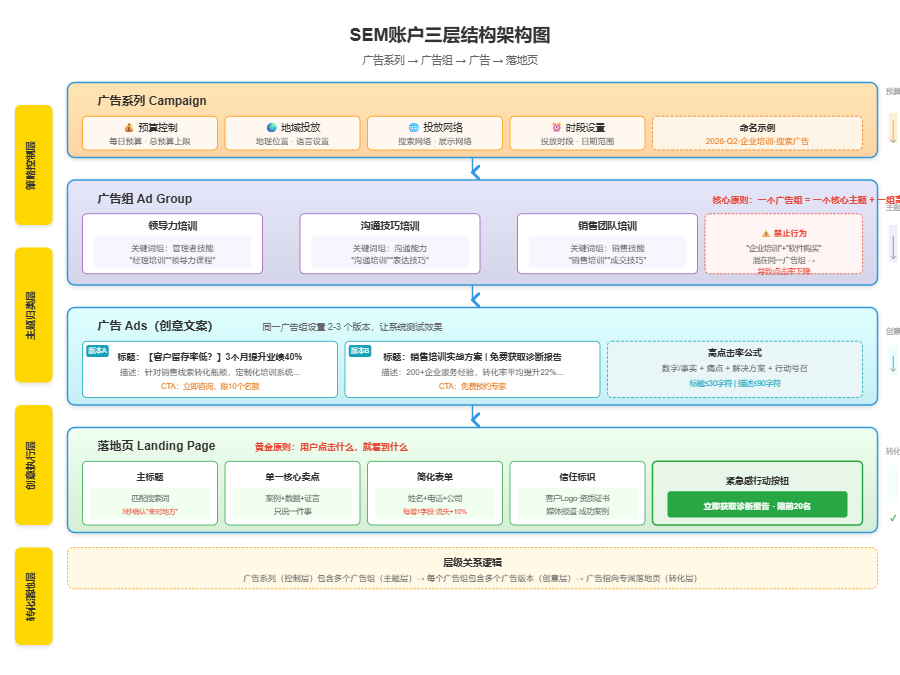
Step 3: Give your account a clear skeleton - a three-tier structure
Confusing accounts are black holes in your budget. You need a clear three-tier structure to manage it; it's like folders:
- Advertisement Series: Control the total budget and general direction. For example, “2026-Q2-Corporate Training-Search Ads”. Here you set the daily budget, the network (usually only the “search network”), the geographic location and the language.
- advertising group: Categorized by topic. There can be multiple ad groups under one campaign. For example, “leadership training”, “communication skills training”, “sales team training”. Each ad group is organized around a set of closely related keywords.
- a commercial: Specific creative copy. You can set up 2-3 different versions of ads under one ad group and let the system test which one works better.
Principle: One ad group, one core theme, one set of highly relevant keywords. Don't mix the keywords “corporate training” and “software purchase” in the same ad group, which will result in the ad copy not being accurately matched and the click-through rate dropping.
Step 4: Write ads that people have to click on
Search results are the battlefield and your ad is the first salvo. It must catch the eye and give a reason to click within 0.5 seconds.
Use this verified formula:Numbers/facts + pain points + solutions + call to action。
For example, for the keyword “poor sales team training”:
.
- Heading 1 (within 30 characters): [Low customer retention? 3 Months to Improve Team Performance 40%
- Heading 2 (within 15 characters): Sales Training | Practical Solutions
- Description line 1 (within 90 characters): Customized training system for sales lead conversion bottlenecks. Has served 200+ companies, conversion rate increased by 22% on average.
- Description line 2 (within 90 characters): Get a free industry diagnostic report + customized solutions. Enquire now, limited to 10 places.
- Finalized URL:
https://yourdomain.com/sales-training-landing
Attention:
- Try to include core keywords in your title, users will see them bolded.
- Use of call-to-action phrases: “Ask for a consultation now”, “Get it for free”, “Limited time slot”.
- path display(Final URL suffix) can be set to be dynamic and auto-populated with keywords searched by the user to make the landing page perception higher.
Step 5: The Landing Page - The Promise Must Be Delivered Here and Now
This is the most critical leap. Users click on ads with expectations built up from the title and description. If yourlanding pageIt's not the same thing as advertised, and he'll leave immediately.
The golden rule: what the user clicks on, they see. It is forbidden to link advertisements to the home page of a website.
If you advertise a “sales training program”, the title of the landing page must be “Customized Training Programs to Improve Your Sales Team's Performance”, and the content must be centered on sales training, not all of your company's business.
A landing page is not a company's official website; it has one mission:Enable the current visitor to complete the conversion action. It must contain the following elements:
- main titleThe user's search terms and ad promises must be precisely matched, and he must be told within 3 seconds that he has come to the right place.
- Single core selling point: Say only one thing and prove it quickly with the strongest evidence (cases, data, testimonies).
- Forms Simplified to the Max: Ask only the most necessary information. For the first call, name + phone + company is enough. With each additional field, churn can go up by 10%.
- trust markLogos, screenshots of successful cases, certificates, and icons of media reports. Text says “I am good”, rather than let others say “he is good”.
- Action buttons with a sense of urgency: “Get Diagnostic Report Now”, “Free Appointment with Specialist”, “Limited to First 20”. Colors should be eye-catching and contrast strongly with the background.
These are the five points that are missing. Like an effective sale, meeting, exchanging pleasantries, demonstrating value, building trust, and facilitating action, all in one fell swoop.
Step 6: Be alert to the first red flag - bounce rate
The ads go live and the money starts to be spent. The first statistic to keep an eye on isbounce rate(Bounce Rate). If it's over 70%, it means that the vast majority of people clicked in, took a look and turned it off, and you're wasting your money.
If there is a bounce rate higher than 70%, check these three items in turn:
- Matching ads to landing pages: Play the role of the user yourself, search for your keyword, click on the ad, and ask yourself, “Is this page what I want?” If hesitant, rewrite the ad or change the landing page title.
- Page loading speed: Test your landing page with Google's PageSpeed Insights tool. Half of people will leave if it loads in more than 3 seconds on mobile. Compress images, enable browser caching, simplify code.
- Mobile Adaptation: More than 60% of searches occur on cell phones. When you open a landing page on your own cell phone, are the forms good to fill out? Are the buttons nice to click? Does the text have to be zoomed in to be read? Any lack of adaptation is a rejection of the customer.
Step 7: Get the funnel going and collect data
After completing the six steps above, your firstconversion funnelAnd the build is complete. Now, set up conversion tracking. In Google Ads, use the “Conversions” feature to track successful pageviews for form submissions on landing pages (e.g. thank-you.html). This is your lifeline to all subsequentIntelligent BiddingThis data is relied upon for the evaluation of the effectiveness of the program.
Initially, set a conservative daily budget (say $100) and let the system run for 3-5 days. The goal at this stage is not to acquire a large number of leads, but tovalidate (a theory): Verify that keywords are accurate, that ads are engaging, and that landing pages convert.
Based on the data from the first few days, you'll be able to start fine-tuning: pausing keywords with lots of clicks but no conversions; optimizing ads with low click-through rates; and tweaking the copy on landing pages. This build-test-optimize cycle is the core rhythm of SEM work.
Now you have a base system that works on its own and brings in clues. It's not perfect, but it has the foundation to learn and evolve. From this foundation, we can introduce even more power - letting AI take over the complex optimization work and spend every bit of your budget on clicks that have the highest probability of converting.
How AI makes every penny count
Your conversion funnel is running, people are clicking, people are filling out forms, and data is starting to accumulate. But that's just the starting point. What really separates the gap is what you do next with that information, how you let the system make decisions for you that are faster and more accurate than manual labor.
AI's role in SEM isn't to show off, it's to take the load off. It takes over the things that humans can't do: calculating the conversion probability of each click in real time, testing dozens of ad versions at the same time, and identifying the ones most likely to buy among tens of millions of people. All you have to do is set clear goals for the AI and then make judgments at key points.
These five modules below are your complete path to bringing AI into SEM.
Smart Bidding: Let the system be your 24-hour bidder!
Manually adjusting bids is a thing of the past.Google Ads'Intelligent Bidding(Smart Bidding) has been able to predict the probability of conversion for this particular click based on real-time signals from each auction - device type, geographic location, search period, browser history - and then automatically determine the bid level.
What you need to set is not “how much a click is worth“ but “how much a conversion is worth“.
Specific operations:
In Campaign Settings, find “Bid Strategy“ and select “Target Cost Per Conversion“ (tCPA) or “Target Return on Ad Spend“ (tROAS). Enter the cost you're willing to pay for a single lead, or the ad return multiple you'd like to achieve per sale. The system will automatically learn and adjust around this goal.
Key Premise: Your account must have a steady flow of conversion data first.Google officially recommends accumulating at least 30 conversions/month before the system has enough samples to learn. Don't rush to turn on intelligence, AI will guess blindly when there is not enough data, instead of burning money.
If there is a fluctuation in conversion costs beyond 20%:
Check for recent major promotions, holidays or mass entries from competitors that can disrupt the system's learning curve. Suspend smart bids and go back to manual control for 3-5 days, then cut back to automatic when the market stabilizes.
Predicting audiences: letting AI find people for you
You've already got a few closed customers, and AI can analyze these people for common traits - age ranges, interest tags, search behaviors, device preferences - and then find new users who “look like“ them in a sea of people. "them.
That'sForecast Audience(Similar Audiences or Predictive Audiences).
Specific operations:
In the “Audience Groups“ module of Google Ads, select “Create Similar Audience“, and set the similarity ratio based on the list of converted users (you need to upload email or CRM data in advance). It is recommended to start from “the most similar top 10%“, this group has the highest probability of conversion and is suitable for testing budget.
A more advanced approach is to overlay signals. Using ”converted users“ as a seed, and then overlaying “recently searched for competing keywords“, AI will look for people in the intersection of these two circles - both like your customers, but also with a clear intent to buy. Clear purchase intent.
If it appears that click-through rates for similar audiences are lower than the account average:
It means that the seed user profile is too broad and the AI learns the noise. Narrow the seed list to only take paying customers within the last 90 days, or raise the customer price threshold to allow the AI to learn a more precise profile.
Creative test automation: say goodbye to guessing which ad is better
Writing ads is not a one-shot deal. You should run multiple versions at the same time - different headlines, descriptions, call-to-actions - and let the system automatically distribute the traffic to quickly figure out the winner.
Google Ads“ “Adaptive Search Ads" (Responsive Search Ads) is this logic. You provide up to 15 titles and 4 descriptions, and the system combines and tests them in real time, gradually showing more to the best performing combinations.
Specific operations:
Create at least 2-3 adaptive search ads per ad group to provide differentiated material:
- One group emphasized the price advantage: “Starting at $99 with no hidden fees”
- A group that emphasizes social proof: “Serving 100,000+ businesses with a 4.9 favorable rating”
- One group emphasizes the sense of urgency: “50% off for a limited time, only 3 days left”
The system will converge to the optimal mix in a few weeks. Don't manually pause versions that “don't look right“, let the data speak for itself.
If it appears that a particular ad group has been running for a month and still has no clear winner:
The material is not differentiated enough for the system to differentiate. Rewrite the headings to widen the gap - one is entirely about functionality, one is entirely about emotional benefit, and test another round.
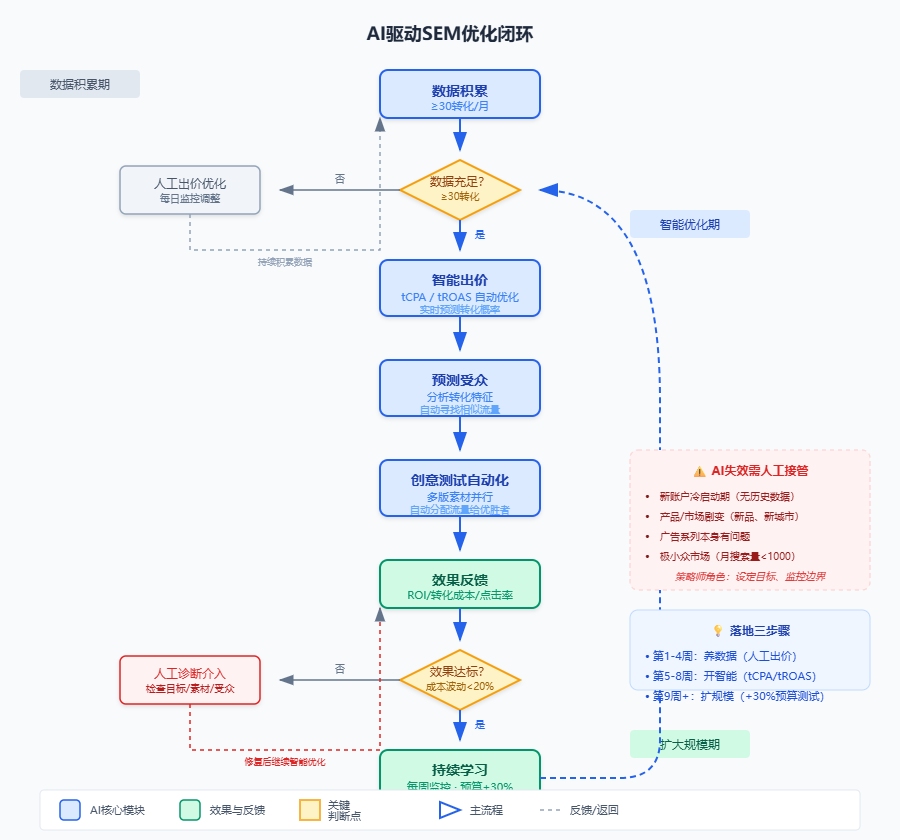
Three steps to landing an AI strategy
Don't think of AI as a switch that works at the flick of a switch. Its value needs to be unlocked in stages:
Step 1: Feeding the data (weeks 1-4)
Maintain manual bids and monitor daily to accumulate at least 30 conversions. The focus at this stage is to validate that all parts of the funnel are working - keyword intent is accurate, landing page conversions are normal, and tracking codes are not underreported.
Step 2: Open Smart (weeks 5-8)
Once the data is up to snuff, turn on target CPA or target ROAS bids. Also enable predictive audience and test similar crowd packs. At this time, reduce the monitoring frequency from daily to weekly to give AI enough time to learn and avoid frequent interventions due to short-term fluctuations.
Step 3: Scaling up (from week 9)
Once the smart strategy is running steady, gradually increase the budget by no more than 30% at a time. while testing new creative directions, new audience stratification, and allowing the AI to continue to learn on new variables.
If there is a plunge in conversions of more than 50% after turning on smart bids:
Pause immediately and go back to manual bidding. Check conversion tracking settings - the most common pitfall is wrong goal settings, such as setting “add to cart“ as the goal instead of “complete payment“, and the AI will try to optimize for the wrong behavior.
AI isn't everything: these are the times when a human must take over
Even the smartest systems have blind spots. Don't count on AI to solve the following situations:
- Cold start period for new accounts: No historical data, no way for AI to learn, first 30 conversions must be optimized out manually
- Dramatic product or market changes: Going live with new products, entering new cities, sudden price cuts by competitors - AI learns based on the past and is unresponsive to sudden changes
- There's something wrong with the campaign itself.: High click-through rates but no conversions, slow loading landing pages, poor lead quality - diagnose and fix manually before handing over to AI for amplification
- niche: Keywords with less than 1000 monthly searches, the sample is too small for AI's statistical advantages to be utilized
Your role changes from “operator“ to “strategist“: set goals, prepare materials, monitor boundaries, and step in when AI fails. Spending 2 hours a week looking at trends instead of 2 hours a day adjusting bids - that's the real efficiency of AI.
Now your funnel can both run on its own and evolve intelligently. But when the leads are flowing in, the real test has just begun. The speed of response, the way you follow up, the grading of leads - these are the pieces that determine whether or not the SEM investment will ultimately turn into real money.
🔗 Related resources: The Official Guide to Google Ads Smart Bidding
Google's official document detailing the working principles and application scenarios of various smart bidding strategies
Up to 1 hour response time
While the previous four chapters addressed flow and tools, this chapter addresses the human link - speed and temperature.
Leads grow on their own, but they don't close on their own.SEM delivers accurate traffic to your doorstep, and what really pushes the close button is the speed and temperature at which you respond to the lead.An MIT study picked up tens of thousands of records of corporate responses: leads responded to within an hour were a full seven times more likely to close than those responded to 24 hours later.24 hours and the golden window slams shut. This isn't to rush you into anxiety, it's to give you the math - response rate is written directly into conversion rates.
Step 1: Automation + manual division of labor, don't wear yourself out at the starting line
The moment a lead comes in, the first thing the system should do is acknowledge receipt, not wait for you to finish your lunch.
- Robots respond in seconds: set up automatic triggers with a tool (HubSpot, RD Station, ActiveCampaign, whatever) - the lead submits the form and immediately receives a message, “Your message has been received and a dedicated advisor will contact you within 1 hour. “ The very existence of this message is reducing churn.
- Manual follow-up in depth: after the automated confirmation, the person must take over within 1 hour. It's not “as soon as possible“, it's a 60-minute red line etched into the calendar. whatsApp, phone, email, pick a primary channel and assign the follow-up task to a specific person.
If the robot sends a confirmation but does not trigger a manual follow-up: check whether your CRM has set up “lead allocation rules“, the common pitfall is that the leads are not assigned to the person in the pool, or assigned to the colleagues who are already off work.
Step 2: Grade the leads, don't hit everyone with the same set of words
Not all leads are worth calling immediately. Grading is about slamming limited manpower on the most valuable cards.
Labeled by two dimensions:
- Source channels: SEM search ads leads with clear intent, labeled “hot“; social media points over, need to be re-educated, labeled “warm“; offline activities to retain funds, look at the depth of interaction.
- The completeness of the form: if you leave your cell phone number + company name + specific needs, it's “hot”; if you only leave your email address and name, it's between “warm” and “cold“.
Matching response strategies after grading:
- Hot leads: direct phone or WhatsApp contact within 1 hour, push trial or offer.
- Warm Clues: Send packet + case within 2 hours, call within 48 hours to confirm receipt or not.
- Cold Claim: Enter the automated nurture sequence, a weekly letter of valuable content that doesn't consume labor for the time being.
If there are too many hot leads for manual follow-up: Tighten the criteria for “hot“ - for example, by requiring both “search term with purchase intent“ and “Form completion degree of 80% or more“. The standard is clear, in order to protect the team's energy.
Step 3: Pick the right channel, don't wait in the mail for someone you want to chat with
Different channels correspond to different communication rhythms, and choosing the wrong one is tantamount to going back in vain.
- WhatsApp: good for instant conversations, quick confirmation of needs, sending voice or video to build trust. Speed of response is life or death here - users expect minute responses.
- Email: Ideal for detailed information, product whitepapers, quotations. Accept 24-hour cadence, but the subject line must be specific, don't write “About your inquiry“, write “Comparison table of the enterprise version of the program you are inquiring about“.
- Phone calls: good for high-value leads, complex needs, and scenarios where you need to talk through multiple options at once. Schedule time in advance, don't swoop in.
If it appears that WhatsApp has been read and not returned: switch channels and reach again - email to make up the details of the program or follow up with a phone call after 48 hours. Don't die on the same channel.
Step 4: Don't give up and don't harass if you don't get a response after following up
A silent trail is not a dead trail, it's just not the right time. Give her a step back.
- After 48 hours: send a case study or customer testimonial with a headline or first sentence that points out a specific scenario in the other industry. For example: “XX company (peer) solved the inventory turnover problem you mentioned in 3 weeks”.
- After 7 days: mark as dormant lead, stop active reach, replace with one light content letter per month (industry newsletter, product update), just maintain presence. set up tags in CRM for future reactivation.
If it appears that the lead suddenly comes back for advice 7 days later: the first time you check the history, open with the specific needs she left in the first place - “You mentioned before that you wanted to solve XX problems, we just went live with a new feature that is right on target”.
The previous chapters taught you to buy traffic, build funnels, and optimize bids with AI. This chapter lets you turn that into real money - take SEM-bought clicks and actually turn them into customers with 1-hour response redlines. And to run this smoothly, you need more than just enthusiasm, a set of tools while you're at it, and a data dashboard where you know which numbers to look at every day when you open your eyes.
The toolkit and at-a-glance data you need
Good tools don't let leads get stuck in the flow, and clear data doesn't let you guess where to push.
The previous chapter talked about the principle of 1 hour response, this set of play to run, you have to string three things into a ring: the tool is responsible for executing the action, the data is responsible for telling you whether the action is right or wrong, and you are responsible for making judgments in between. Tools determine the upper limit of efficiency, data to eliminate decision-making fuzzy, lack of one are blindfolded running wild.
Take care of the tool stack first: Google Ads is your hands, Google Analytics is your eyes, and RD Station/HubSpot is your notepad.
It's not the number of tools, it's the ability to hit the ground running. A standard SEM-driven growth closure requires only these three core configurations, and that's how you should be building it from day one.
- Google Ads: The engine that puts in the money and spends it by hand.
The keywords, bids, and smart optimization mentioned in the previous chapters all happen here. Your job is to give it clear goals (conversion value) and then let it burn money for results. Don't think of Google Ads as a billboard, think of it as a vending machine - put in the coins, put out the drinks. It's not good at creativity or temperature, that's a human job.
- Google Analytics 4: Tracking eyes to see how the coin fell out.
You need to install GA4's tracking code on your website and landing pages. Its core task is to answer two questions: what did the user end up doing after clicking in from which ad? At what point did they get stuck and leave? Without this eye, Google Ads is a blindfolded gamble; you only know how much money was spent, not on which path it worked.
🔗 Related resources: Google Analytics 4
Free Website and User Behavior Analytics Tools, Essential for Tracking Conversion Paths
- RD Station or HubSpot: A notepad of clues to manage the people who come in.
This is the centerpiece of the “automation + labor” chapter on response funnels. Bots, lead grading, and follow-up email sequences all rely on this tool. It notes where each lead came from, what they looked at, and what message they responded to, so that your 1 hour follow up isn't a “warm greeting” but a “follow up to the above”. By connecting SEM and CRM tools, leads really enter your sales system.
These three tools aren't something you use for a month before you pick them, they're infrastructure to be equipped on the first day of work. If you don't have an account yet, sign up and configure them in this order:
The first step is to have a Google account and open Google Ads and GA4.
The second step is to connect your website and main landing page to GA4 to make sure the data is flowing in.
Step 3: Go to the RD Station or HubSpot website, sign up for an account, and install their plugins and tracking codes.
Step 4: In the Google Ads backend, tie the conversion goal to the RD Station/HubSpot lead event.
If there is delayed or incorrect data after registration: wait 24-48 hours for the data to initialize and check that the tracking code is installed successfully on all sites, verified with GA4's real-time reporting feature.
Pair it with two more optional but good ones: the Adsmurai and Semrush, one to help you spend money smarter and one to let you know how others are spending it.
It's worth considering when your monthly ad budget exceeds five thousand dollars, or when you start advertising on different platforms (such as both Google and Meta).
- Adsmurai: It's a cross-platform AI optimization tool.
Its value is to keep an eye on the ad campaigns of several platforms at the same time for you and find out which bid gets the same conversion for less money. You can think of it as an experienced pitcher, but it doesn't rely on intuition, it relies on algorithms. When you have accumulated some conversion data in your account (such as meeting the 30 conversion prerequisites mentioned above), Adsmurai can help you enter the “smart bidding” state more quickly, especially in the budget allocation strategy.
- Semrush: It's a market intelligence tool.
You do keyword research but don't know what words your competitors are spending money on that you haven't found.Semrush can help you see your opponents' ads and ranking trends, discover new opportunity words or avoid red ocean words that they are already heavily engaged in. This helps to optimize your account structure and the direction of word expansion.
🔗 Related resources: Semrush
Keyword Research, Competitive Analysis and SEO Tool Platforms
If you're on a budget, the core three are enough to get you from 0 to 1. These two tools are investments you'll want to consider when you're in the “1 to 10” phase and you want to scale up or become more efficient.
Then, you need a data dashboard: daily, weekly, monthly, just looking at those four numbers.
The tools are loaded and the data starts to flow. Don't be dazzled by dozens of metrics in the backend, keep your eyes on only four key values and develop a regular rhythm of watching.
- ROAS (return on advertising investment)This is the final report card for your SEM strategy. The formula is "Revenue Generated from Ads ÷ Ad Spend". It tells you how much money you made back for every dollar you spent. 2026, stop looking at how much you spent and look at how much you made. A healthy ROAS goal is at least 3:1, or 3 dollars for every dollar spent.
🔑 critical: When setting your ROAS goal, make sure it matches your actual business profits. An initial generic target of “3 for $1” (3:1) is the starting point, and you must calculate your “break-even ROAS” based on industry average profit margins and customer lifetime value, and set a safe and competitive target based on that.
- CPA (cost per customer acquisition): This is what it will cost you to acquire a valid lead (or a customer). It measures the efficiency of your funnel. the CPA to compare is the gross profit you can make from the customer. A simple rule of thumb is that CPA should be less than one-third of a customer's lifetime value. If the CPA continues to go up, it means your funnel is getting more expensive, more clogged, or more competitive.
- conversion rate: The percentage of users who go from clicking on an ad to ultimately completing your desired action (retention, purchase). It is a direct reflection of the attractiveness of your landing pages and funnels. If ROAS and CPA are not looking good, conversion rate is usually the first suspect to troubleshoot.
- Lead to Close Marketing Qualification Rate (MQL to SQL Rate): This is the metric that sales and marketing focus on. Simply put, it's how many of the leads you paid for were deemed “worth following up” by the sales team. This is a direct validation of the accuracy of all of your previous tactics - keywords, ad copy, projected audience.
Now, allocate time for these four numbers to look at it:
- everyday: Look at the trend line for conversion cost (CPA).
Take 1 minute and open the chart to see how the two days compare to the same period last week. If there is an abnormal jump, it's time to investigate the cause today (e.g., check if the landing page is crashing). You don't need to do any optimization, you just need to build your intuition about what “normal fluctuations” and “abnormal alerts” look like.
- daily: Look at the churn rate at each level of the funnel.
The funnel goes from display → clicks → visits → conversions. Every Monday morning, take 15 minutes to look at the change in conversion rates for each segment. For example, if the click-through rate is high but the conversion rate plummets, it means that the ads are attracting the right people, but the landing page isn't catching it. That's when it's time to optimize the landing page, not to adjust the bid.
- every month: Look at channel ROAS comparisons.
Spend half an hour at the end of the month comparing the ROAS of different keyword groups, different campaigns, and the ROAS of SEM and other channels (such as social media ads.) This will tell you where to invest more and less of your budget next month.
If there are conflicting fights between data: don't rush to adjust your strategy, stop and check three places first.
- First, check for duplicate installations of tracking code on your website。
Most commonly the GA4 code is loaded twice, or the old version of the code is not deleted cleanly. This can cause a conversion to be double-counted twice, resulting in an inflated conversion number and a CPA that looks abnormally low but doesn't match the sales. Use a browser plugin such as “Google Tag Assistant” to check this.
- Second, check whether the conversion goal setting is harmonized。
Is the “one conversion” defined in Google Ads, GA4 and your CRM tool (e.g. RD Station) the same action? Is it a “click on the submit button” or a “jump to the thank you page”? All tools must track the same event. Any inconsistency will prevent the data from aligning.
- Third, check the attribution window for consistency。
If a user clicks on an ad three days before placing an order, should the revenue be attributed three days ago or today? This is called the “attribution window”. In the backend settings of Google Ads, GA4, and CRM, look at the attribution model (usually “data-driven attribution” or “final click attribution” by default) and make sure that their time windows (e.g., 30-day click attribution) are consistent. Otherwise cross-platform comparisons between ROAS and CPA are meaningless.
The tools are there, the data will be read, and it's the same as you driving with a dashboard and steering wheel. But there are always potholes on the road, and the dashboard will light up with warning lights you've never seen before. In the next chapter, we'll tell you straight up what those common potholes look like, and how to make a quick judgment call and punch the gas to get over them instead of stopping and calling for help.
You don't have to go through all these potholes yourself.
The dashboard has a red light on, now it's time to know where to fix it. The first few chapters set up a complete conversion funnel, tools are complete, the data will see, but SEM this work, stepping on the pit is the norm, do not fall into the same pit twice to be able to. This chapter directly gives you five first aid prescription, each corresponding to one of the most common symptoms, read the end of the problem can be judged in which step, which line to move.
Symptom 1: Traffic is pouring in, not many leads - your landing page is driving people away!
Ads are burning quite happily, click data is beautiful, but the number of conversion does not move. At this time do not suspect Google Ads, the problem eighty percent in the landing page.
Measure speed first: open your landing page and run through it with a tool like Browser Developer Tools or GTmetrix. If the first screen loads in more than 3 seconds, churn jumps 10% or so for every extra second. Mobile is even worse, it's 2026, if the page is typographically incorrect on the phone and the buttons don't click, you've bought all your traffic for nothing.
Check two places:
- Image size: compress large images to less than 100KB, use WebP format instead of PNG/JPG
- Third-party plug-ins: form tools, chat plug-ins, tracking codes, each of which slows down the speed of the process.
If the mobile bounce rate is much higher than the desktop: the probability is that the responsive layout collapsed, or the buttons are too small and the false touch rate is high. Test directly with the real phone, don't just look at the simulator on the computer.
Symptom 2: Conversion costs get more expensive the more you raise - someone is taking your spot, or you're casting your net too wide!
CPA went from 50 bucks to 80 and then to 120, this trend doesn't put the brakes on and sooner or later ROAS will collapse.
Check the competition first: Use Google Ads“ bid analysis report to see if the ”share of first-page display rate" has been taken away by new rivals. If there is a new brand to enter the price, your bidding efficiency will naturally decline. At this time, do not fight, change a number of long-tail words or adjust the time period strategy to avoid the peak period when people have the most ammunition.
Double-check the match method: are your keywords set to “broad match”? This will allow Google to stuff your ads to a large number of relevant but imprecise searches. For example, if you sell “enterprise CRM software”, broad match may trigger “what does CRM mean”, “CRM free version” and this kind of pure curiosity traffic. Wasted clicks and zero conversions.
If there is a spike in clicks for a keyword but a sudden drop in conversions: immediately pause the term, check the search term report, and add irrelevant queries to the negative keyword list.
Symptom 3: Sales scolds you for the poor quality of your leads - your ads are helping to screen competitors
Leads came, sales followed, and found that all the asking price to accompany the run, the demand does not match, the budget is simply not enough. This is not a sales problem, is the front-end screening leakage.
Back to your ICP definition: what does the ideal client really look like? Company size, industry, job title, urgency of pain points, these conditions have to be translated into the advertising hierarchy.
Specific actions:
- Adding thresholds to ad copy: Instead of “free consulting,” write “solutions for businesses with annual revenues of $5 million or more.”
- Add screening questions in the landing page form: the first screen is not in a hurry to ask for a cell phone number, first ask a key business question to filter out the pure curiosity party
- Use a negative audience: keep out obvious mismatches (e.g. competing company names as keyword exclusions)
If there is a plunge in form submission rates but a big jump in follow up turnover: this is a good thing, it means that pre-screening is working, continue to optimize the copy to make the threshold more visible.
Symptom 4: AI optimization is worse when it's on - don't let the algorithm run wild on the wrong data
Intelligent bidding and predicting audiences sounds great, but sometimes the results go downhill instead when you turn it on. At this point don't blame the AI for not working, first check that you're giving it the right ingredients.
Immediate implementation:
- Suspend smart bids, cut back to manual bids, stabilize the base
- Go into the “Conversion” settings of Google Ads and check the conversion goal definition: is it “button click” or “form submission and then jump to the thank you page”? If it's the former, bots clicking on your form to test it will be considered a conversion, and the data will be dirty!
- Check the conversion counts in GA4 and CRM to see if the three-way numbers match. If Google Ads shows twice as many conversions as actual units, it indicates a duplicate count or a confusing attribution window
If you confirm that the tracking data is accurate and then re-open the intelligent bidding: give the system at least two weeks to learn time, during which only to do observation and not hand-tuning, frequent switching strategy will make the algorithm is always in the “re-learning” state.
Symptom 5: Budgets burn through in half a day, spending three days' worth in one day - your account is running naked!
The daily budget is set at 500, and at 10:00 a.m. it is zeroed out, and the traffic in the afternoon all depends on the opponent's performance. This is not “good results to increase the money”, is the account structure in the leakage of money.
Three locks on at the same time:
- Setting a hard cap on daily budgets: With the shared budget tier set to death, individual campaigns can't hit the ceiling even if they float.
- Open conversion optimization before not adding budget: smart bidding needs historical data, new accounts directly on the high budget + smart, is equal to let the algorithm sprint in the maze, the probability of hitting the wall is extremely high!
- Avoid blind bidding on shopping festivals: Black Friday, 618, Double 11, the budget of big brands is three times the usual, and your CPA will be forced up. Small players either test the material a month in advance to pick up the slack, or simply avoid the peak, don't follow the burning money
If there is a budget depletion but few conversions: immediately check whether it is attacked by malicious clicks or robot traffic, look at the IP report, the source of unusually concentrated clicks is directly excluded.
- Check if the landing page loads faster than 3 seconds
- Verify that the mobile page layout is correct and that the buttons are accurately clickable
- Verify that the keyword matching method does not introduce a large amount of irrelevant traffic due to “broad match”.
- Check the Search Term Report to add irrelevant queries as negative keywords
- Confirm that the ad copy and landing page filtering mechanism meets your ICP definition
- Verify that conversion tracking events in the Google Ads backend are consistent with CRM data
- Setting a limit on total daily consumption for account budgets
- Check real-time consumption reports to troubleshoot for malicious clicks or bot traffic
One last bit of truth.
These five pits, 90% SEM accounts have stepped on at least three. The difference is that some people stepped on it and immediately climbed out to correct the direction, and some people in the pit then burned the budget, burned to no money before doubting life. You now have a dashboard in hand, and know which screws to turn when the light is on, the rest is to remain vigilant in the daily optimization, to minimize the cost of trial and error.
The previous seven chapters covered the complete chain from building an account to raising leads, with all the tools, data, and troubleshooting first aid that should go with it. But between knowing and doing, there is still a concrete action calendar - when to start, what to do in the first week, what to verify in the third week. Not to fill you with chicken soup, is the “read this” into “do this” the last layer of transformation.
A three-week roadmap starting today
The toolkit is in hand, the holes are filled, but there's always a tomorrow between “knowing how to do it” and “starting to do it”. The final chapter of this guide is a three-week calendar of all the instructions. Don't think about it too much, just check off the boxes one day at a time, and after you've completed the set of closed loops, you'll be on your way.
Week 1: Ignite, go live, and keep an eye on the funnel entrance
This week's mission is not to get more pretty, but to get the system running, even if there's only one ad series spinning.
- Create a new branded account in Google Ads dedicated to testing, turn off all the “smart features” that are recommended by default, and don't let the system make decisions for you.
- Against the funnel model from Chapter 2, build a campaign with 2-3 core ad groups, each centered around a highly relevant keyword topic.
- The landing page must strictly correspond to the advertisement title and selling point, don't use the website homepage to temporarily replace. Form fields can be streamlined to three items: cell phone number, name, and company, and other information can be added later.
- Setting up “Submit Form” as a conversion event in Google Analytics 4 and importing it into Google Ads is the eye of system optimization.
- In RD Station or your CRM, set up an automated process for receiving leads: after a lead is submitted, an automated confirmation email/sms is sent and a notification is pushed to the salesperson's to-do list.
- Determine with the sales team: who is responsible for following up when this notification is received and must respond within 1 hour.
- Create a brand new account in Google Ads dedicated to the testing of this program
- Turn off all default recommended “smart features” in your account settings.”
- Build a campaign that contains 2-3 ad groups around different core keyword themes
- Create or validate the target landing page for the ad, ensuring that its copy strictly corresponds to the ad's headline and selling points
- Check and set up landing page forms, streamlining required fields to three: cell phone number, name, and company
- Setting “Submit Form” as a Conversion Event in Google Analytics 4 (GA4)
- Successfully imported the “Submit Form” event from GA4 into Google Ads Conversion Tracking
- Setting up an automated notification process for form lead submission in CRM
- Face-to-face communication with the sales team and confirmation of the first responder and the “must contact within 1 hour” rule
Week 2: Getting the machine to start learning while optimizing your front-end
Traffic starts to come in, data and problems surface, and this week is a critical window for tweaking and introducing intelligence.
- After a week of observation, if the account has accumulated more than 30 conversions, open the “target cost per conversion” smart bidding strategy. If not 30, keep the manual bidding for another week.
- Export the first week's search term report and add queries that are completely unrelated to your product to the negative keyword list.
- Analyze the landing page data: if the bounce rate exceeds 70%, go back to the ad immediately to check the intent match; if the form submission rate is lower than 5%, check if the form is too complex or has too few trust marks.
- Based on the source of the lead (e.g. “SEM-Consulting Product A”) and the completeness of the form (email and cell phone are considered “hot”, only email is considered “warm”), create a hierarchical labeling of the leads in CRM Create a hierarchical labeling of leads in CRM.
- Test your 1-hour response: randomly sample a few leads to see if sales actually makes an effective contact within an hour.
If the budget is consumed very fast after the smart bidding is turned on, but the conversion is not kept up: pause immediately and check whether the conversion data is accurate, for example, whether the visits to key pages like the “thank you page” are tracked correctly.
Week 3: Evaluating whether it's worth adding money and building a long-term optimization clock
The system has been running for two weeks and it's time to speak with the data and decide whether to scale up or redirect.
- Calculate initial ROAS and CPA. is the CPA less than a third of your customer's lifetime value? If not, prioritize optimizing the front-end funnel (ads, landing pages) instead of blindly adding budget.
- Take the 5-10 leads that have been followed up and closed and go for a quick focus with the sales team: how well does the quality of these leads match your expectations? If sales complains that most don't match, go back to week 3 to do pre-screening of keywords and ad copy.
- Dedicate a fixed 2 hours per week: review last week's CPA and ROAS trends on Monday morning, and analyze conversions at each level of the funnel on Thursday afternoon.
- Based on the data from the previous two weeks, decide whether to increase the budget. A safe rule is to consider increasing the daily budget by 20-30% only when ROAS is consistently met and CPA is less than one-third of the customer lifetime value.
- Create a regular monthly review agenda: the first week compares the overall ROAS for the previous month; the second week examines the results of testing landing pages and new ad materials; and the third week analyzes the performance of the new audience strategy.
How can I tell if I'm considered a success?
Don't use your feelings, use these three hard indicators to self-assess; any red light means there's a hole somewhere:
- Is the CPA less than one-third of a client's lifetime value? This is the economic foundation of the business. If it's not, it means your customer acquisition costs are too high and you either need to optimize your funnel efficiency or recalculate your customer value.
- Does the sales team recognize the quality of these leads? Their feedback is the ultimate thermometer. If sales is willing to take the initiative to follow up and consistently have closes, it means your traffic screening is spot on.
- Are there consistent and predictable new customers each month that are contributed by this SEM funnel? This shows that the system is not a matter of chance, but a sustainable production line.
Next: make these three weeks a rhythm
By the end of the three-week roadmap, your goal is not to “complete an assignment” but to turn “test-analyze-optimize” into muscle memory.
- Test at least one new audience strategy each month, such as expanding with predictive audiences or using remarketing to retrieve visitors who abandoned the form.
- A batch of ad creative material must be updated quarterly; even the best ads will fatigue users.
- Revisit your overall conversion funnel once a year; customers, markets, and products change, and your funnel has to evolve with them.
From “read this article” to “run through your first SEM funnel,” you've taken the most critical steps from awareness to action. This three-week calendar is your starter, and now the clock has started on week one.
